


You decided to start a podcast for your business, but now you’re overwhelmed by the choices for podcast hosting. Captivate, Buzzsprout, Spotify for Creators, Podbean…so many options for podcast hosting, but which one is the best one for you and the type of podcast you are creating? When you are a business owner starting a podcast, you need a hosting platform that offers the best features to support your business and podcast goals (hint: 9 times out of 10, the free option isn’t the best option). If you’re currently researching podcast hosting platforms, this blog is for you. Continue to read to learn how to choose a podcast hosting platform for beginners. You’ll learn which features to look for when podcasting for your business, as well as my top podcast hosting recommendation.
How to Choose a Podcast Hosting Platform for Beginners: What Features to Look for

1. Ease of Use
The first thing you want to look for is a podcast hosting platform that is simple to use, especially if you are a beginner. There’s already a lot to figure out when starting a podcast, so finding a hosting platform that is straightforward is a must. Check out reviews for the podcast hosting platform you’re considering, or ask others what they’re using and what their experience has been to determine which platform is right for you.
2. Upload and Storage Limits
Some podcast hosting platforms set upload and storage limits based on the tier you choose. Try to choose a podcast hosting platform that offers unlimited upload and storage so you don’t have to worry about reaching your limit.
3. Distribution to Podcast Listening Apps
Distributing your podcast across all podcast listening apps is important for reach. Not all of your ideal listeners use Apple Podcasts or Spotify, so make it easy for people to find you by making your podcast available on all of the podcast listening apps. Most paid hosting platforms offer distribution across all major podcast listening apps.
4. Podcast Analytics
When podcasting for your business, you need to track your podcast analytics. Analytics help you learn about your audience and how they are engaging with your content. You need to know more than download numbers and where in the world people are tuning in. Look for a podcast hosting platform that includes data such as the number of unique listeners, episode performance comparisons, and which podcast listening apps your audience is using to consume your content.
5. Dynamic Ad Insertion
While dynamic ads aren’t necessarily a must have, they’re a nice to have as an entrepreneur with a podcast. Dynamic ad insertion allows you to insert ads promoting events you’re hosting, offers, or anything that is time sensitive that your audience needs to know about. Also, look for podcast hosts that offer a bulk ad editor, where you can click a button to insert your ad at the start or end of each of your published episodes. This comes in handy as you publish more episodes.
6. Podcast Player Customization
While podcast player customization may seem insignificant, it is important for brand recognition. Look for a podcast hosting platform that allows you to customize the podcast player with your brand colors. Your podcast player will be embedded in the show notes you post on your website, so having it on brand helps listeners start to recognize your brand.

7. Regular Platform Updates and New Features
The podcast industry is always changing and making updates, so a podcast hosting platform that stays up to date with what’s happening in the podcast space is important. Look for podcast hosting platforms that regularly update and add new features. This will help ensure your podcast keeps up with the changes in the podcast world.
8. Pricing
Podcasting is not free. There are certain fees or up front costs that come with starting a podcast. Compare podcast hosting platform pricing and choose one within your budget. If you can afford it, go with the annual plan for your podcast host to save money.
9. Number of Downloads Per Month
Some podcast hosting platforms have a cap on the number of downloads you can get per month, depending on which plan you’re on. For instance, podcast hosting platforms like Captivate start you at 30,000 downloads per month with their personal plan. If you’re anticipating a high number of downloads per month, go with a plan that either doesn’t cap downloads or offers a high monthly limit.
10. Customer Support
Having a podcast hosting platform that has live people you can talk to when you need technical support is a non-negotiable. You shouldn’t have to wait weeks to get help with an issue with your podcast. While most podcast hosting platforms boast of their top notch customer support, you’ll want to actually speak to some of their customers to find out what it’s truly like.
My #1 Recommendation for Podcast Hosting: Captivate

While there are several great podcast hosting platforms available, Captivate (use this affiliate link to try Captivate for free for 30 days) is my top recommendation for business owners starting a podcast. It meets all of the criteria discussed above. It’s simple to use, offers many great features, and has among the best customer support around. It’s also one of the hosting platforms that actually caters to business owners instead of just hobbyist or influencer podcasters. But don’t just take my word for it. Keep reading to learn more about Captivate and its many great features.
Captivate Hosting Review
What Features Does Captivate Have?
Podcast Analytics
Captivate’s podcast analytics are detailed and supply you with a lot of information about your listeners. Their analytics include:
- Downloads
- Unique listeners
- Episode performance and comparison
- Where in the world are people listening to your podcast
- What podcast listening apps and devices are people using to listen to podcasts
They also include your web player analytics in your downloads number. Lastly, you can export your analytics to CSV, which is a great option for tracking your metrics monthly.


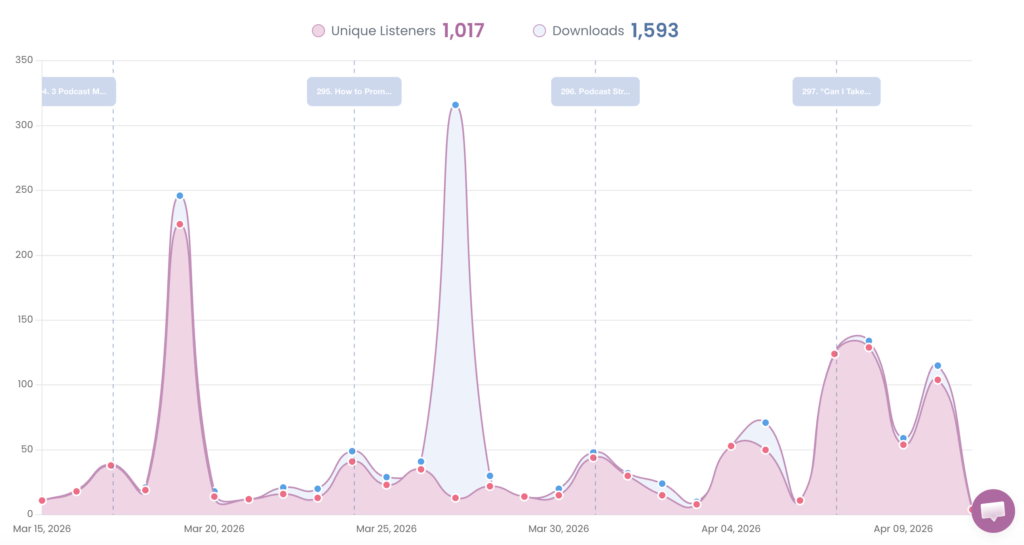

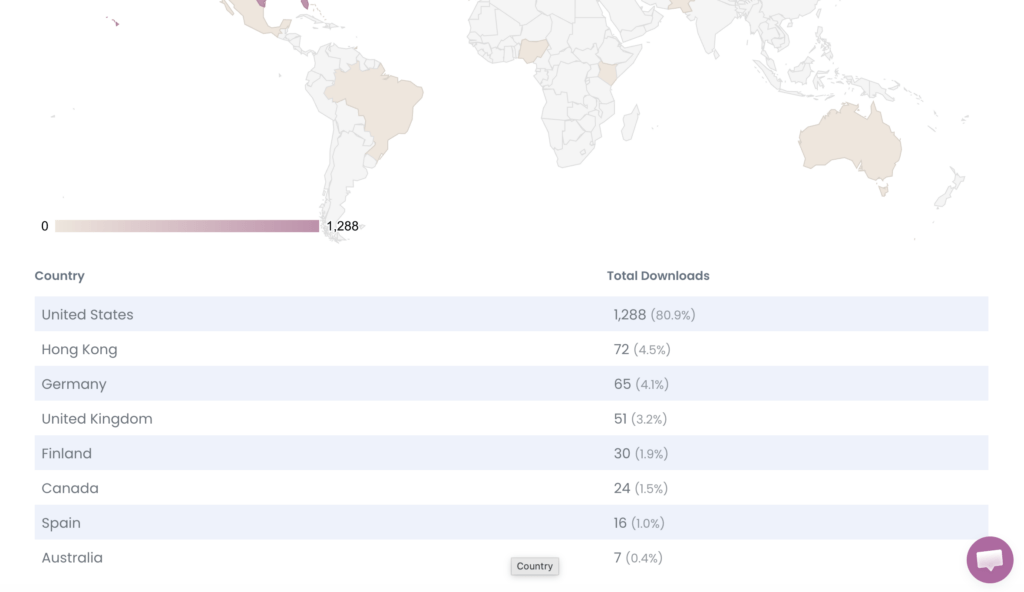
Images of Captivate’s podcast analytics dashboard.
Unlimited Uploads and Storage
There are no limits on uploads or storage with Captivate, and this is true across all their plans. You can have peace of mind knowing that you don’t have to monitor your storage space. You’re also able to create an unlimited number of podcasts on each of their plans. The only limits they enforce are the number of downloads per month. The Personal Plan is 30,000 per month, the Professional Plan is 150,000 per month, and the Business Plan is 300,000 per month.

Distribution to All Major Podcast Listening Apps
You don’t have to worry about limiting your reach with Captivate because it offers distribution to all of the major podcast listening apps, including Apple, Spotify, Amazon Music, Pocket Casts, and more. The platform also offers a simple one-click distribution for each of these platforms (although sometimes Apple Podcasts can be a pain and still require you to go in manually to distribute).
Marketing and Monetization Features
As a business owner starting a podcast, marketing and monetization features are a must, and Captivate has some great ones. They let you create unique promotional links so you can track who converts into your free and paid offers directly from your podcast. It integrates with many email service providers. It also offers features that let you sell memberships, exclusive content, and sponsorships, and accept tips.
Dynamic Ad Insertion
The dynamic ad insertion feature is one of my favorite aspects of Captivate. Its bulk ad editor makes it simple (literally with the click of a button) to insert and remove pre-roll or post-roll ads. You can also insert mid-roll ads, but you need to listen to ensure they go in a good spot.

Customizable Podcast Player
Captivate allows you to change the color of your podcast player to match your brand colors. It’s simple to do and prevents your brand colors from clashing when you embed the podcast player on your website.
Episode Workflow Tools
Streamlining your podcast production workflow is an important way to prevent podcast burnout. Captivate provides tools that help simplify your workflow. They offer episode idea planning, where you can brainstorm and store episode ideas, and default publishing times so you don’t have to choose your publish time each time. The dynamic show notes builder comes in clutch because you can create a show notes template, so you just have to fill in the missing information each time you go to publish a new episode. Captivate also integrates with Descript and Zapier, which can also help reduce production time.

Private Podcasting
One thing I have found is that most business owners who start a podcast eventually end up making a private podcast. Private podcasts make great lead magnets, can be used for additional content for membership and programs, or used for creating audio summits. Captivate offers unlimited private podcast feeds, making it simple to get started with private podcasting. Their private podcast feature allows up to 50,000 subscribers per private podcast feed (a major improvement from 100 with their Personal plan). The only downside to their private podcasts is that you’ll need a tool like Zapier to automatically add new subscribers to the private podcast feed.
Guest Booking and Interview Management
While you may not be thinking about having guests on your podcast yet, it’s good to know that Captivate has a guest booking system within the platform. You can customize your booking page and manage all aspects of your guest interviews. It also integrates with your public calendar. Although I don’t personally use this feature (I have my guest booking set up through Dubsado), it is nice to have if you don’t want to have to create something extensive on another platform.
Free Resources and Workshops (Captivate Growth Labs)
Last, but certainly not least, are all of the free resources and workshops Captivate offers. It seems like every month, Captivate offers a workshop or special live event for its customers that helps them in all areas of podcasting — from podcast growth to monetization. They also have an extensive resource center that answers all of your questions. I honestly haven’t seen anything this extensive on any platform. They truly go above and beyond to support their customers.
Is Captivate Good for Beginner Podcasters?
Captivate podcast hosting is simple to learn and use, making it a great option for beginner podcasters. Their customer support is very responsive and supportive, so if you have any questions, you will get the support you need. They also have an extensive library of resources that walks you through how to use every aspect of their platform. The Captivate team hosts live workshops anytime they add a new feature.
How Much Does Captivate Cost? (Pricing Breakdown)
There are three plan options available with Captivate – Personal, Professional, and Business. Here’s the pricing breakdown:
- Personal Plan: $19/month or $204 for the year
- Professional Plan: $49/month or $528 for the year
- Business Plan: $99/month or $1080 for the year
Each plan includes all Captivate features; however, the number of downloads per month varies depending on the plan you’re on (see the unlimited uploads and storage section for the exact numbers).


Pros and Cons of Captivate Podcast Hosting
Captivate offers many great features, but it has a couple of minor flaws. Here’s an overview of the pros and cons of the platform:
Pros:
- Comprehensive podcast metrics (not just downloads)
- Unlimited podcast feeds, including private podcast feeds
- Regular platform updates and new features
- Excellent customer support
- Unlimited storage and uploads
Cons:
- Private podcasts require a tool like Zapier to automate adding listeners
- Higher price point than some of the other popular podcast hosting platforms, like Buzzsprout and Podbean
While Captivate is more expensive than hosting platforms like Podbean and Buzzsprout, they offer unlimited uploads and storage, as well as features like private podcasts. They also keep adding new features, such as remote podcast recording and podcast editing. So, in the long run, the price is worth it because you get more.

Podcast Hosting Platforms I Don’t Recommend
While there are many podcast hosting platforms to choose from, not all are created equal. Three platforms I do not recommend are Libsyn, Spotify for Creators, and Substack.
Libsyn
Libsyn used to be the top podcast hosting platform, but after an update, it became a nightmare for many podcast hosts. Things like scheduled episodes not going live when they were supposed to, and other glitches made it unreliable. You also have to opt into their professional or enterprise plans to access unlimited storage, dynamic ad insertion, and advanced analytics (you also have to contact them for pricing on both plans).
Spotify for Creators and Substack
I lumped these two hosting platforms together because they are both free podcast hosting options. While they aren’t bad in and of themselves, they are not ideal for business owners starting a podcast. Neither platform offers extensive podcast distribution as many paid platforms do, which limits your reach. Substack podcast hosting provides limited podcast metrics, including download numbers and your listeners’ locations. Spotify has greatly improved its podcast metrics, but you can only see metrics for Spotify (it doesn’t include downloads and other metrics for Apple Podcasts or other platforms). Spotify does offer dynamic ad insertion, but Substack does not. You can create private podcasts on Substack; however, for Spotify for Creators, you have to use a different hosting platform, such as Transistor or HelloAudio.
Final Thoughts
When podcasting for your business, choose a podcast hosting platform that aligns with your business goals. Look for hosting platforms that offer the features you need. My top recommendation is Captivate, which offers a free 30-day trial if you use my affiliate link. If you’re wondering what you need to start a podcast or looking for helpful resources, you can start here:
- Podcast Launch Course: Podcast Like a Business Owner
- Blog: 12 of the Best Podcast Tools for Podcasting Business Owners
- Episode 286: How to Start an Audio Only Podcast for Your Business in 2026
- Episode 292: Why 90% of Podcasts Fail in the First Year (And How to Make Sure Yours Doesn’t)
- Episode 294: 3 Podcast Mistakes to Avoid When Launching Your Podcast (Plus a Bonus)
This blog post may contain affiliate links for products and services I personally use and love. If you click one of the links and make a purchase, I may earn a commission at no additional cost to you.



Comments +